Showing posts with label design. Show all posts

Interstate Diagram Print Sample!

First print sample of my Interstate Diagram poster came in today. This one is from an online on-demand printer - I love the size (36" x 24"), and the colors look great as well, nice and bright! I could even make the type a little bit smaller at this reproduction size, which could neaten things up a bit. Still waiting on a couple of different printers before I make a final decision on which way to go.

Prints will be for sale soon - let me know if you're interested by emailing camgbooth -AT- gmail -DOT- com!

UPDATE: Posters - in both 25" x 17" and 36" x 24" sizes - are now available for purchase here.

Eisenhower and H.C. Beck's Love Child

UPDATE: Prints of this diagram are now available for sale here.

Here's the result of my latest "designing stuff because I feel like it" phase: a map of America's comprehensive Interstate highway system in the form of a metro or subway map.

I came across a very different take of this on the internet last week, an incredibly simplified, very rectangular (and very orange!) diagram by Chris Yates. Many viewers of this map were calling it a "Beck style map" (after H.C. Beck, the originator of the London Underground Diagram) or a "subway style map", but on the whole, I disagreed with that point of view.

The best examples of subway maps use strong colour codes for separate lines and a clear hierarchy of detail (interchanges, major stations, minor stations, etc.) to convey a lot of information rapidly and clearly. And while there is some degree of geographical distortion in most metro maps (the centre of London in Beck's diagram is greatly enlarged compared to the outer suburbs), there should always be an underlying sense of the relationship between destinations in reality and on the map.

So that's what I set out to create - a simplified diagram of the Interstate system in the style of the best transport diagrams. Armed with Google Earth, Google Maps, Wikipedia, a gridded pad of paper and pen, Adobe Illustrator CS3, Chris Yates' map and another excellent map by Rebecca Brown that I found on Flickr, I began my Herculean task.

Early on, I decided that the "major" highways (those divisible by 5) would form the framework of my diagram. These would be thicker of line than the minor roads, and would be distinctively colour coded. Their termini would also be called out in a bolder fashion than the other roads. This was done relatively painlessly, with very little rejigging required to make all the major intersections line up. I was surprised at how much this simple grid already looked like America's borders, which gave me great hope that things were going to work out well.

Then it was onto fitting the minor highways into this grid. Even though these roads don't have specific colour codes, I strove to give some extra information in the shades of grey used: a darker gray was used for even-numbered roads (running from west to east; lower numbers to the south, higher numbers to the north) and a lighter grey for the odd-numbered roads (running from north to south; lower numbers to the west, higher numbers to the east). Each road has its number marked at each terminus, with a full key at the bottom of the map for cross-reference. A bit of tweaking was required here and there to make every road and name fit neatly (it gets a bit crowded in the eastern states!), but in general everything worked out beautifully. I even managed to show concurrency of Interstates by running the "lines" next to each other, just as they do on subway maps.

Then I added the Great Lakes, coastline, borders and the key. Done!

All up, this project took around a week to complete. There's still some little tweaks and fixes to make, and I feel sure that road aficionados across the country will be only too ready to point out my errors as time goes by, but overall, I'm extremely happy with the way it turned out!

Some oddities: I-99 breaks the grid by being placed to the WEST of I-95. Apparently, the number was written into Section 332 of the National Highway Designation Act of 1995 by Bud Shuster, then-chair of the U.S. House Committee on Transportation and Infrastructure, the bill's sponsor, and the representative of the district through which the highway runs. Why? Maybe he thought 99 was a cool number for his local highway?

I-97 is to the east of I-95 (as it should be), but it is the only Interstate that does not intersect with any other. In fact, all of I-97 lies in one little county just outside Baltimore.

Oh, and here's a direct link to a much BIGGER version (more pixels than can fit on your screen!)

Graphic designer: the amazing job-absorbing career

Over the last few weeks, I've been filling in my non-working time (of which there's been a little too much lately, unfortunately) by teaching myself CSS (Cascading Style Sheet) design for the web. It's a necessary skill to have as a designer these days, as table-based layouts are very much frowned upon these days. CSS basically helps to separate the content of a site from its style (the way it looks), which makes future design changes and updates easier - in theory! Of course, there's all sorts of little hacks and workarounds that you have to know to make your code work with all browsers, some of which are surprisingly non-standards compliant (I'm looking at you, Internet Explorer!).

As I set about my task, it occurred to me that modern graphic designers probably have a higher skill set and have absorbed more jobs than any other job out there. Let me explain...

When I started as a designer over 15 years ago, computers were just starting to gain a foothold in the industry. They were used to create black and white "keyline" artwork that was output by a high-resolution imagesetter, then mounted on board and painstakingly marked up by hand with instructions for the film house. I've lost count of the number of times that I had to write something like, "Enlarge transparency #3 120%, strip transparency to keyline, delete keyline" on the overlay sheet for a piece of artwork - just to get one picture at the right size in the right place. And everything was defined like this: colours, pictures, fills, gradients. In its way, this was the CSS of the day – instructions that gave style to the basic wireframe of the black and white artwork.

Back then, you trusted the film house to interpret these instructions and produce an output that could be used by the printers to make plates for the final printing. But as computers got more powerful and software more sophisticated, more and more work began to be done by the designer, rather than the film house. Files began to be produced with all the colour information and images already included, moving far more of the creative process directly into the designer's hands. In effect, graphic designers started to absorb what was traditionally the role of the film house. They still scanned images and produced the film and proof for printing, but all of the "magic" they used to do was now in our hands. Move forward to now, and film houses all but extinct – artwork now goes directly from designer to printer, where printing plates are made directly from the digital file.

Much the same happened with image retouching. Once Photoshop entered the market, expensive and wizardly "systems work" began to be done by (the much cheaper) inhouse staff, sometimes disastrously, sometimes very well indeed. There's still no substitute for a professional retoucher, but a lot of designers come very close in most instances, especially on a budget.

Then came the internet revolution and a whole new set of skills for designers – web design. Suddenly designers had to know HTML and Flash, and if they knew how to code, even better. Designers who had worked solely in print suddenly had to think in RGB and in terms of time and animation. Of course, the inverse is also true, because there's a whole generation of young designers out there who started in web design and now produce some of the sloppiest finished art for print that has ever been seen.

So... print designer, web designer, image retoucher, film combiner, coder and often concept developer, illustrator and copy writer as well. Not bad for one job, eh?

Trajan Is The Movie Font


Many of you may have seen this video on YouTube (it's rather popular, apparently!). As a designer, I find it absolutely hilarious - mainly because it's absolutely true!

I do disagree on one point, though: Trajan hasn't totally overrun the entire movie industry quite yet. There is one segment that resists the classical charms of this font, that being comedy movies. Don't worry, though, they have their own lazy designers who more often than not, resort to this:

BIG FAT SANS SERIF FONTS.

Almost always Gill Sans Bold (possibly one of the ugliest sans serif fonts ever, and an embarrassment to the Gill Sans family) or Futura Extra Heavy. If you can squish the kerning up to join all the letterforms together, then you're well on the way to the perfect comedy movie title.

So why does this repetition happen? Laziness, for sure. Why think of a new font/logotype for each new movie when you know that something that was done previously will work just as well. In a way, these typeface choices act as a kind of visual shorthand for the viewing public: Trajan = Epic. Distressed Trajan = Horror. Big Fat Sans Serif = Wacky Comedy. Adam Sandler. Jim Carrey. Straight away, you have some kind of idea about the movie. That's a plus on a crowded video store shelf, where you've only got a few seconds to attract a potential viewer. Not that I'm condoning this kind of design at all... I can't stand lazy, no thought typography. I was always taught to pay close attention to the appropriateness of type, and I think it's a great thing to remember.

Let me give you an example. At a previous agency, a client asked us to design a logo and brochure that evoked a stylish, 1930's kind of feel. I briefed the job into a junior designer and went away to do my own work. A couple of hours later, I checked in with the junior and was horrified to find that they had typeset the whole thing in Helvetica.

"Why did you do that?" I asked.

The junior simply replied, "Because it's a nice font".

And it can be, if set well. There are agencies out there who only use Helvetica Neue in every job they do, and it looks fantastic. But in this case, Helvetica was not an appropriate font to use. Helvetica was not invented until the 1950's and shares none of the aesthetics of the 1930's period we were trying to evoke. I explained this to the junior, who just looked at me a little blankly and asked which font I would use.

The short answer was "Futura" (because we were on a deadline), but there's more to consider than just the obvious answer. Take a look at this:

Here we have four fonts, all set at the same point size. Firstly, we can see that Helvetica displays none of the characteristics of a 1930's style font: it's what's known as a grotesque font (so called because purists thought this type of type was hideous when first introduced in the late 19th Century), while the others all display elements of the humanist style of sans serif fonts.

The next font, Futura, is appropriate to the task at hand because it's from the 1930s. You can't get more authentic than the real thing. Gill Sans is another font from around the same time period, making it another possible choice.

The last two fonts shown, Neutra and Nevis, are modern, computer generated fonts. But they have the look and feel - the elegance - of a 1930's font and are therefore appropriate. Neutra's extremely small x-height is particularly redolent of 30's style, while Nevis is very heavily based on Johnston Sans, another Eric Gill typeface that is famous for its use on the London Undergound.

A good typographic designer has an innate sense for this kind of stuff - a knowledge of the history of type and the ability to find new fonts that fulfill old roles in design. There's always an obvious choice for a typeface, but sometimes further investigation makes a good design great. For my part, I wish I'sd told the junior designer to use Neutra for that brochure, because it's a lovely, lovely typeface.

Colin Lake & Wellbottom - updated site!

I've just finished revamping the website that I design/manage for Colin Lake & Wellbottom, a local blues band. I've mentioned them plenty of times on this blog before, I'm sure.

The old site was perfectly functional and even looked better than 95% of band sites out of there, but it lacked a certain panache in my eyes. That, and it had been added to in a very hodge-podge manner as the site grew from its initial 3 or 4 pages to the fount of knowledge that it is now. The whole thing is definitely more unified and "designed" now, and it will be much easier to amend and expand in the future.

The real reason I went through all this work to fix a website that didn't have a lot wrong with it? Because it looks awesome in my portfolio! I don't have a whole heap of web stuff in my portfolio, so a quality piece like this will strengthen it immensely!

Logo design - Kildeen Moore Research Fund

Design time – here's a logo that Christine and I combined forces to create.

Dr Kildeen Moore was Christine's much beloved aunt, who very sadly died from brain cancer a few years ago. Members of the family wanted to honour her memory by setting up a research fund in her name, and asked us if we would be able to come up with an appropriate logo.

The idea is all Christine's - she remembered Kildeen as always being the life of the party, so the conga line motif seemed perfect. Her initial concepts actually had the conga line facing left; it was only after we had "slept on the idea" that it occurred to me that the main character would resemble a stylised "K" (for Kildeen) if we flipped the whole thing. I redrew Christine's characters a little bit, added the type and submitted it. The family loved the concept and approved it after only a few minor revisions.

The stethoscope on the "Kildeen" figure was requested by the family: I personally find it a bit fussy for such a simple and stylised logo, but I can understand the reasoning behind it - an instant identifier of this figure as "Dr Kildeen".

New look for the blog!

So, after more than a year, the ol' white type on black was getting a bit grating. Time for something new! I spent most of the day scouring the internet for information on how to get/create a new Blogger theme, with varying levels of success.

I finally found this neat theme, which I've spent a bit of time tweaking to my liking. There may be some more fiddling over the next little while, so forgive us if things look a little wacky at times. I'm still getting the hang of using CSS to determine pretty much every element on an HTML page. It's extremely powerful, but also quite hard to get your head around on the fly. Let us know what you think of the new look!

Famous?

So Colin Lake and Wellbottom's album, Bullet, is finally being released properly. I did the artwork for this way back in February and while I've had my own sample copy of it for quite a while, it's quite exciting to think that it's out there for other people to see. As well as being in bricks and mortar record stores, it's also available on iTunes (as seen in the image above; click on it for a full size image) and Amazon.com (where it's currently rated #639,331 in their Music category!).

Of course, now that I think about it, Colin's fine recording isn't the only artwork of mine that is available for sale on the ol' interwebs, as the CDs I did for Hillsong Church are all out there too. (See here, here and here - they're on iTunes as well as Amazon). Maybe I just have a bigger sense of ownership with Colin's work, helping a new artist out with some quality artwork and design. Whatever - I'm just chuffed for both him and me that it's out there.

W+K Application Submitted

Well, I've put a lot of hard work and thought into my application and I finally sent it off last night – two days before deadline! I'm really pleased with the way it turned out: it looks great, tells a good story and also puts forward the way I see the world through my "designer's eyes".

I've already got a receipt email back from W+K saying that the review process will take 2-4 weeks, so here's hoping! I really don't think I could have done any better. Once final submissions to W+K have closed, I'll post the PDF for people to look at, but until then, everyone will have to fend for themselves!

On another note, 52 Ltd still haven't got back to me on my résumé submission, which is a little disappointing. I'll get in touch with them soon to see what's up... maybe it got lost in the pre-Christmas rush.

Job seeking

As soon as I got my employment authorisation, I started to set the wheels in motion to find a job ASAP.

Even before I had left Sydney for Portland, I had singled out 52 Ltd as a company that could help me: a graphic design recruitment agency that works solely in Portland, helping designers find full-time, part-time or contract work. So I sent them my résumé and portfolio just before Christmas and am now waiting to hear back from them. They did tell me on the phone that they normally review portfolios on a Monday but that due to the holidays, there may be a bit of a delay to their normal schedule.

The other application I have in the pipeline is to the enormous independent ad agency, Wieden + Kennedy. This agency was founded in Portland and now has offices scattered all across the globe: New York, London, Amsterdam, Tokyo, Shanghai and Delhi. There are 337 people employed in Portland alone, and they boast clients like Nike, Coke and Starbucks. Basically, I'd kick myself if I didn't at least try to work for an agency of this calibre.

So I went to their website where I had to fill in a curious little questionnaire, ticking off personality traits and skills that matched me. Then I just hit a button and my answers were "photocopied" – complete with green light buzzing across the screen – and sent on their way.

A few days later, I received this email:

Hi Cameron,

You sound like an interesting person. We want to know more. We want to see what you can do. Send us something before January 15 and maybe win a prize.

The content is up to you, but here's our guideline for format: a pdf document, 20 pages or less, formatted 11x17 inches landscape, no larger than 6MB. It will be viewed on screen and not printed, so design with this in mind.
To be eligible for prizes and adventure, please send to seeking@wk.com before January 15.

Thanks, we're looking forward to learning more about you.

Wow! So I'm guessing from this that they don't want to see my everyday portfolio here... what they're after definitely seems to be an exercise in creativity and communication: a single chance to impress them with my skills. My thoughts were confirmed by another email a couple of days later:

Dan Wieden and David Kennedy created W+K as a place for people to express their voice and create the best work of their lives. This place depends on those people.

We created wk.com/seeking to meet more talented and interesting people. Specifically, people who could work in our creative department - people who can tell a story well in all sorts of media, people who solve problems with ideas. We seek designers, writers and art directors, but expect to find a few artists, product designers, editors, people who create all kinds of things and who don’t fit into a neat basket. People with experience, people who’ve never created an ad in their life. You maybe.

We are on track to receive 6000 profiles by January 1. We will fly 50 of those people to Portland in late March for an adventure. We’ll put you up for a couple of days, you can check out Portland, we’ll meet each other, no strings attached. It ought to be pretty incredible.

Next step, if you haven’t already, is to submit a PDF to seeking@wk.com by January 15. Please follow the specs that Robin sent.

The content of the PDF is open. Tell us your story, show us what you can do. Surprise us, delight us, amaze us.


We can’t wait to see what everyone sends. This is going to be fun.

Even more wow! 6,000 applicants??? It's kind of daunting, but hey, I got into Randwick TAFE's Graphic Design course all those years ago by beating out 3,000 other prospective students! So I've been working away on my document since we got back from Idaho Falls and I'm pretty happy with the way it's turning out so far. There's still a lot of work to do, but at least I have the advantage of a really interesting story to tell! Here's a tiny glimpse of a page that I'm working on:


Keeping busy!

Just because I'm not allowed to seek employment yet doesn't mean I'm not keeping myself busy. It's important to keep my hand in, so to speak, so I set myself little design challenges and projects to keep the brain ticking over. One that I've just completed, and am pretty pleased with, is a redesign of Portland's MAX Light Rail system map. The MAX is a fantastic example of a renewed interest in mass transit in America (fighting back against the omnipresent car!). Twenty years ago, it didn't even exist, now it is an integral part of the city with plans for further expansion.

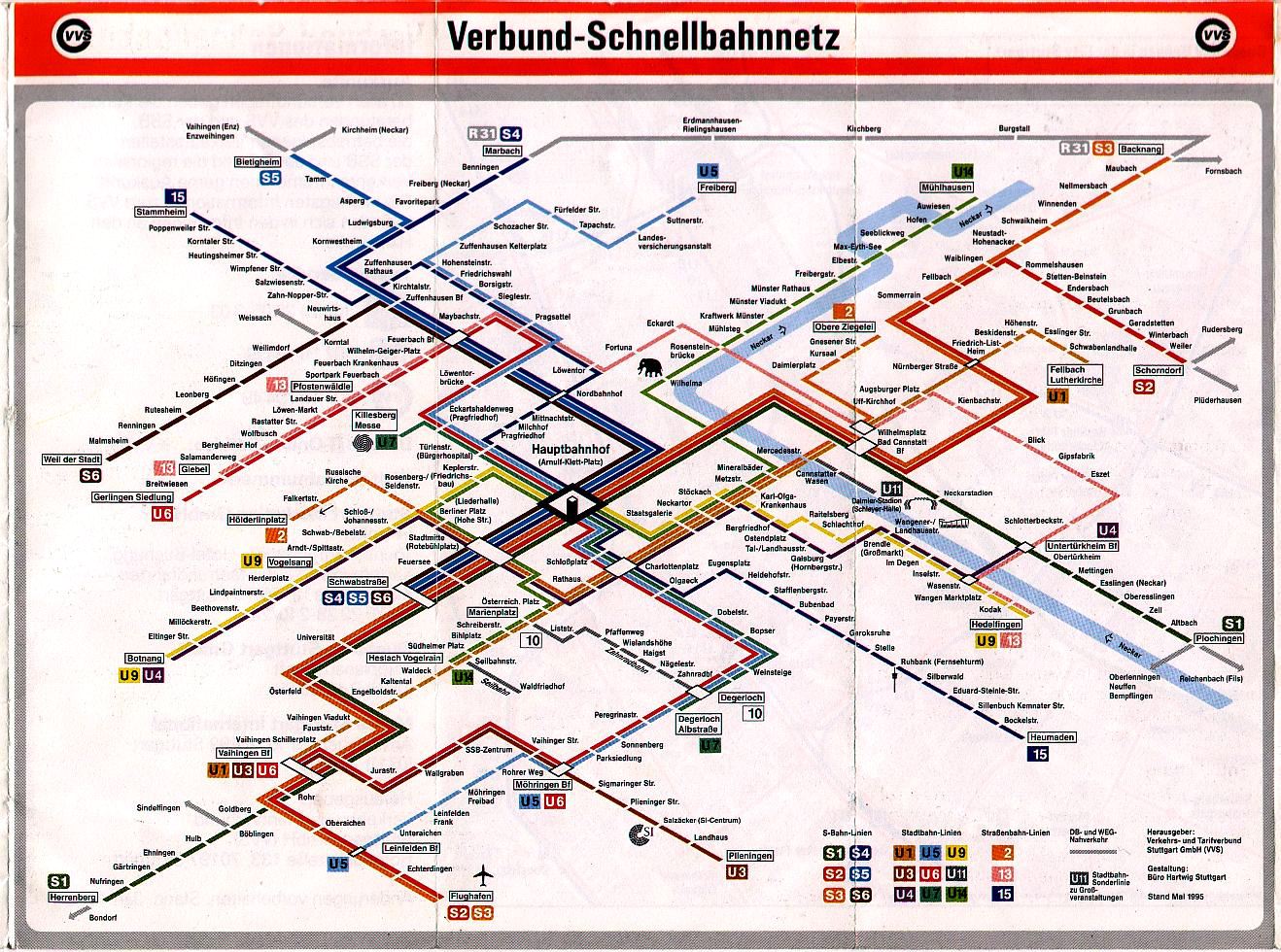
As great as the system is, its system map is severely lacking. I present here the official Tri-Met PDF of the system for your reference. The whole thing is suffering from visual overload... too much information all presented at similar levels of importance. The use of blue type everywhere is overwhelming to the eye and the clumsy use of "TC" and "P" in circles to denote Transit Centers and Park and Ride leads to ugly incidents at Gateway/NE 99th and Parkrose/Sumner, where the designer is at a loss as to where to place the parking symbol. Overall, the map lacks the style and grace of the best transit maps - London, Paris, Sydney and Stuttgart being prime examples of the way to do it right. For a fantastic reference on metro and transit maps around the world, click here.

Of course, I like a challenge... so I decided that I would add in the soon-to-be commenced Green Line as well. This line completely changes the face of downtown as it will run north-south through the nearly completed Transit Mall, rather than east-west as the current lines do. The yellow line will also be rerouted along the mall. Based on information on Tri-Met's site, I have produced this map, which I feel is a vast improvement on the incumbent.

It's a lot more visual than the old map - Transit Centers (white) are now easily distinguished from normal stations (coloured ticks), standard icons are used for Park and Ride and (my addition) bicycle lockers. Black type for station names stops blue from dominating the entire map, and town names are now a shade of grey to stop them from being so visually heavy. Changes of direction in a line are now gracefully curved, rather than abrupt changes of angle. Unforgivably, all type at a 90° angle on the old map read from the left, something I was always taught NEVER to do, so I have amended all the angled type to be read from the right and improved the differentiation between station names and bus route numbers.

The thing that I think reduces clutter the most is the new way I have approached depicting Fare Zones. Rather than use the large and distracting Zone Arrows that had to be placed awkwardly between station names AND the huge travel time lines, I have opted for a far more visual approach and used progressively lighter tints of the line colour. This wouldn't work on a map of the complexity of London or Paris, but on this relatively simple map it works surprisingly well, especially with the legend explaining it so clearly.

I've also included some Portland attractions on the map (the Zoo, Children's Museum and baseball park), although I have cheated and left out the venues at the Rose Quarter. The station name does the work for me there, so it's not too bad. I also like my little pedestrian interchange line between the two Rose Quarter stations, as there's a two block hike between them on foot.

Things I'm not sure about: the curve in the red line to the airport, while geographically more accurate, could be a bit fussy and unnecessary. Also, the travel time lines, while a vast improvement over the old heavy blue ones, don't really work for the downtown part of the yellow/green line, or the Clackamas branch of the green line.

Finally, this whole layout will fall apart somewhat when the extension of the yellow line happens in 2014. From PSU, the line will cross the river and head south to Milwaukie. On my map, this will put Milwaulkie a lot further south than Clackamas, when in reality they are pretty much level. I can't see any better way to represent downtown than what I've done, so it may just have to be that way.

I'd love to hear what you think of my efforts!